Reprint General Ledger Entries
This report will reprint the General Ledger entries for a particular date. You will have to enter the owner or manager’s level password. Next you will be asked to enter the desired date. If there are no totals for that date, you will be notified and given a chance to select a new date. The debits and credits for that day or (if selected) month will be printed. A G/L interface file that can be imported to QuickBooks, Peachtree, Business Works, Tech Systems, Accpac, or Account Mate will also be created for that date.
Print Totals Report - Selecting this option will print a copy of the store totals.. Note: These will not be viewed on screen.
Generate GL Entries - This will recreate the iif files used to import into your accounting software.
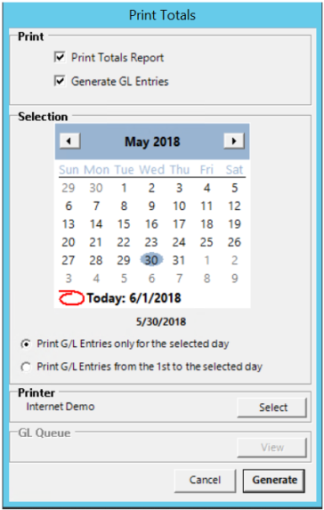
Print GL Entries for a selected day - This will only print the GL entries for the date selected.
Print GL Entries from the 1st to the selected day. - This will print the GL entries from the beginning of the month to the date specified.
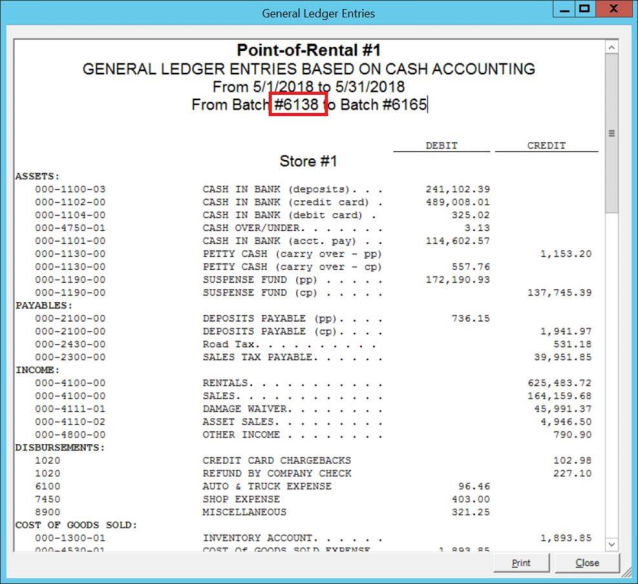
This report will indicate the batch preceding the beginning batch in the report to the last included batch. As seen in the screenshot below 6138 (4/30/18) to 6165 (5/30/18)

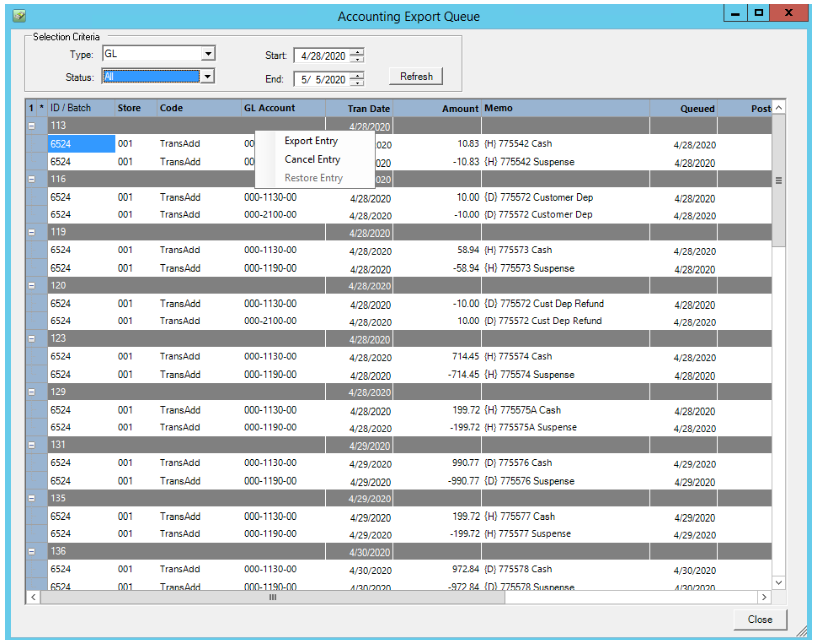
This screen is also used to interact with exported G/L entries if the user is integrated with an accounting software that facilitates live batch processing (Intacct, GP, Prophet 21)

This view will open the interactive G/L screen. The batches can be filtered by date and status. If an account number or amount is incorrect, it can be modified here by clicking on the value.

Batches can also be exported, canceled and restored by right clicking on the grey header. The export can be initiated after an account number or value has been corrected. Something that has been cancelled can be restored by navigating to the cancelled status to restore.